Teach your AI · Step-by-step guide
Change what the AI knows or says
Who can open itViewer: noOperator: noSupervisor: noAdmin: yes
Before you start
Section titled “Before you start”You are an Admin: only an Admin can open Your AI and Knowledge (Roles).
Which page to open
Section titled “Which page to open”| You want to change | Open |
|---|---|
| The company name, what visitors may ask about, the words your business uses, the contact and reply time visitors are given | Your AI, Business |
| Who writes in and what happens to each kind, such as a job seeker pointed elsewhere; subjects it should not simply answer | Your AI, Who writes; Restricted topics |
| What it finds out in a chat; whether it may talk about prices, past work and the rest | Your AI, What the AI learns; How it answers |
| All of the above at once, from what a business like yours usually writes | Your AI, Templates (Start from a template) |
| A few sentences about your business, your products and services, key facts | Knowledge, Your business |
| A page, a file, a video or a written answer | Knowledge, Sources or Answers |
On Your AI
Section titled “On Your AI”-
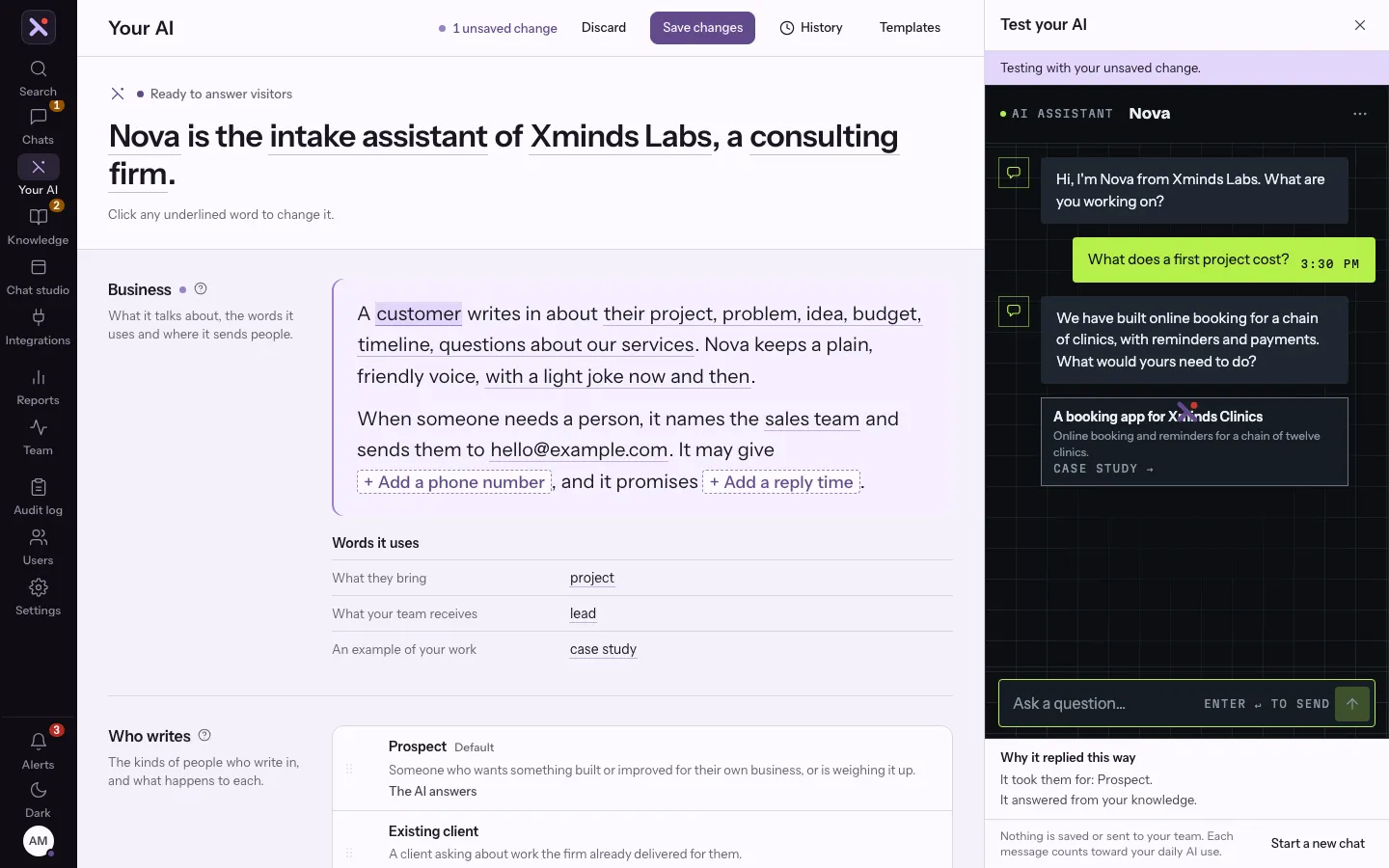
Open Your AI under Work in the menu. It reads as a short description of your AI.
-
Change it. Click an underlined word, or open a row in a list below it. Each word is explained on Your AI, and each field of a row on Who writes, restricted topics and what the AI learns. The bar at the top counts your unsaved changes; visitors see none yet.
-
Press Test your AI. A test chat opens beside the page and says it is testing with your unsaved changes. Ask what a visitor would ask: Why it replied this way says what the AI did. Nothing is sent to your team.
-
Press Save changes. A list of your changes opens, each with Undo. Undo any you do not want, then press Save changes again. Visitors get the change from their next message.
-
Go back if you need to. History keeps every save. Press Bring back on an earlier one to put it in your draft, test it, then save it (Your AI).
On Knowledge
Section titled “On Knowledge”-
Open Knowledge under Work in the menu.
-
Change the business facts. On Sources, open the Your business row, edit it, and press Save changes. They apply from the next reply (Your business).
-
Or change what it answers from. Open a source’s row, or choose Add knowledge for a new one; for an answer of your own, open Answers. Save. The row shows the AI reading it.
-
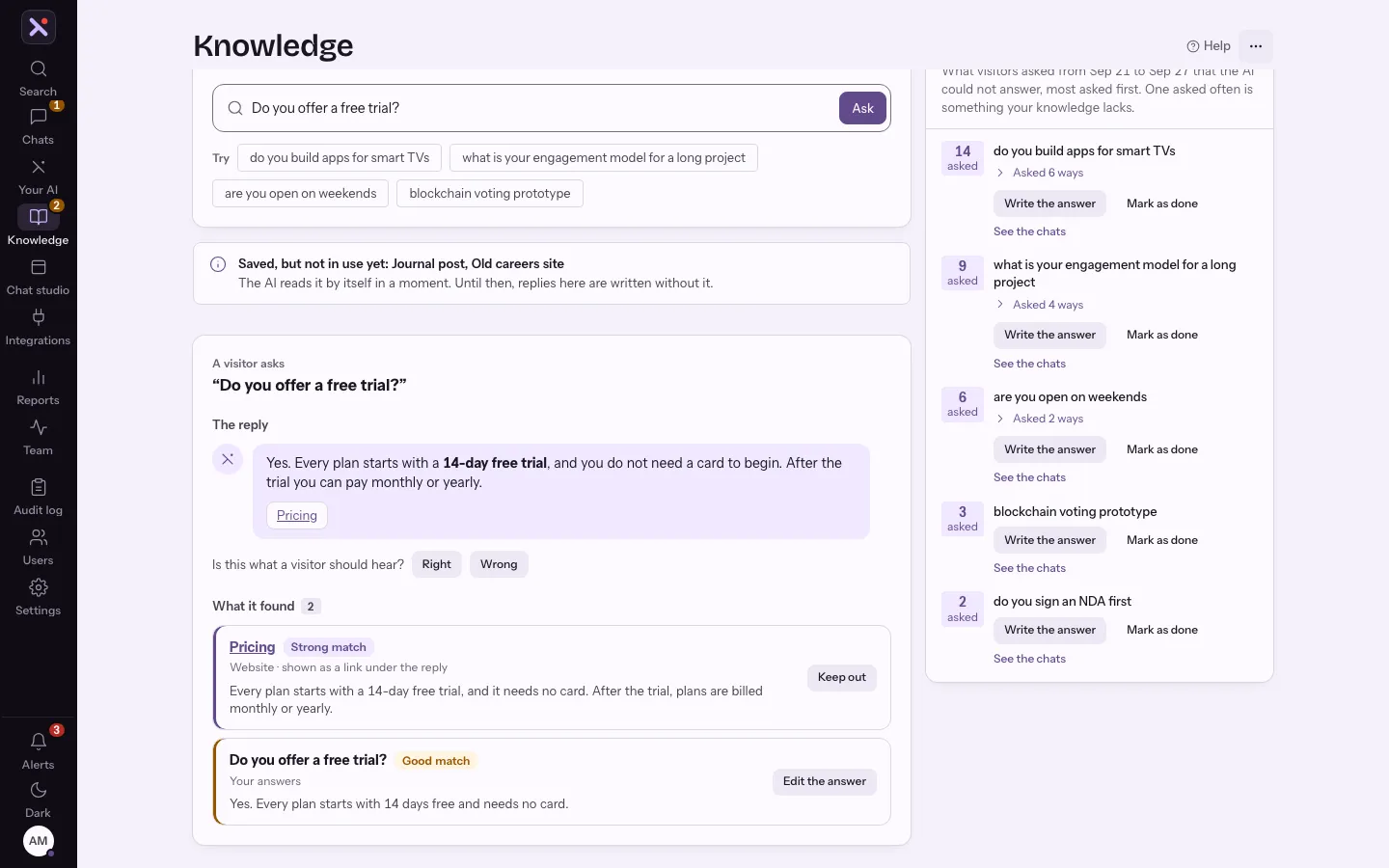
Wait for the row to say In use. If Apply changes automatically is off, press Update now first (Knowledge). Until then, Test and fix says “Saved, but not in use yet”.
-
Ask it. On Test and fix, type a question the change should answer and press Ask. You see the reply a visitor would get and, under What it found, the passages it used. If it is still wrong, press Write the answer (Test and fix).
If something goes wrong
Section titled “If something goes wrong”| What you see | What to do |
|---|---|
| Your AI says “Not answering yet” | No company name is saved, so every visitor is offered a person. Click the company name and save one. |
| “N values need fixing before Save” | A change trips a check. Its field is marked and says why. Fix it, then save. |
| The AI gives a true price, policy or opening time only some of the time | It is on a page the answer did not draw on. Add it to Key facts under Your business, which the AI always has. A price also needs the Prices and terms answer setting (How replies are checked). |
| The chat still says the old thing from a page | The source has not been read yet, or nobody pressed Update now. Wait for In use: once your answer is in use, it wins over a page that says otherwise. If it still does not, your answer may only share a topic with the question; write it the way visitors ask (Answers). |
| The AI answers but never cites your pages | Use your knowledge sources is off on the Knowledge page’s settings (Knowledge settings). |
Related
Section titled “Related”Reviewed
Source files for this page
apps/dashboard/src/views/settings/Audiences.tsxapps/dashboard/src/views/yourai/YourAiPage.tsxapps/dashboard/src/views/yourai/TestChat.tsxapps/dashboard/src/views/yourai/ReviewChanges.tsxapps/dashboard/src/views/yourai/BriefHistory.tsxapps/dashboard/src/views/yourai/BriefTemplates.tsxapps/dashboard/src/views/KnowledgeView.tsxapps/dashboard/src/views/knowledge/SourcesTab.tsxapps/dashboard/src/views/knowledge/TestTab.tsxapps/dashboard/src/views/knowledge/AnswersTab.tsxshared/web/src/views/settings/registry.tsx

