See how it's going
Leaderboard and points
Who can open itViewer: noOperator: yesSupervisor: yesAdmin: yes
Points come from chat reviews, so they are there only while your plan includes them (Chat reviews).
Where to find it
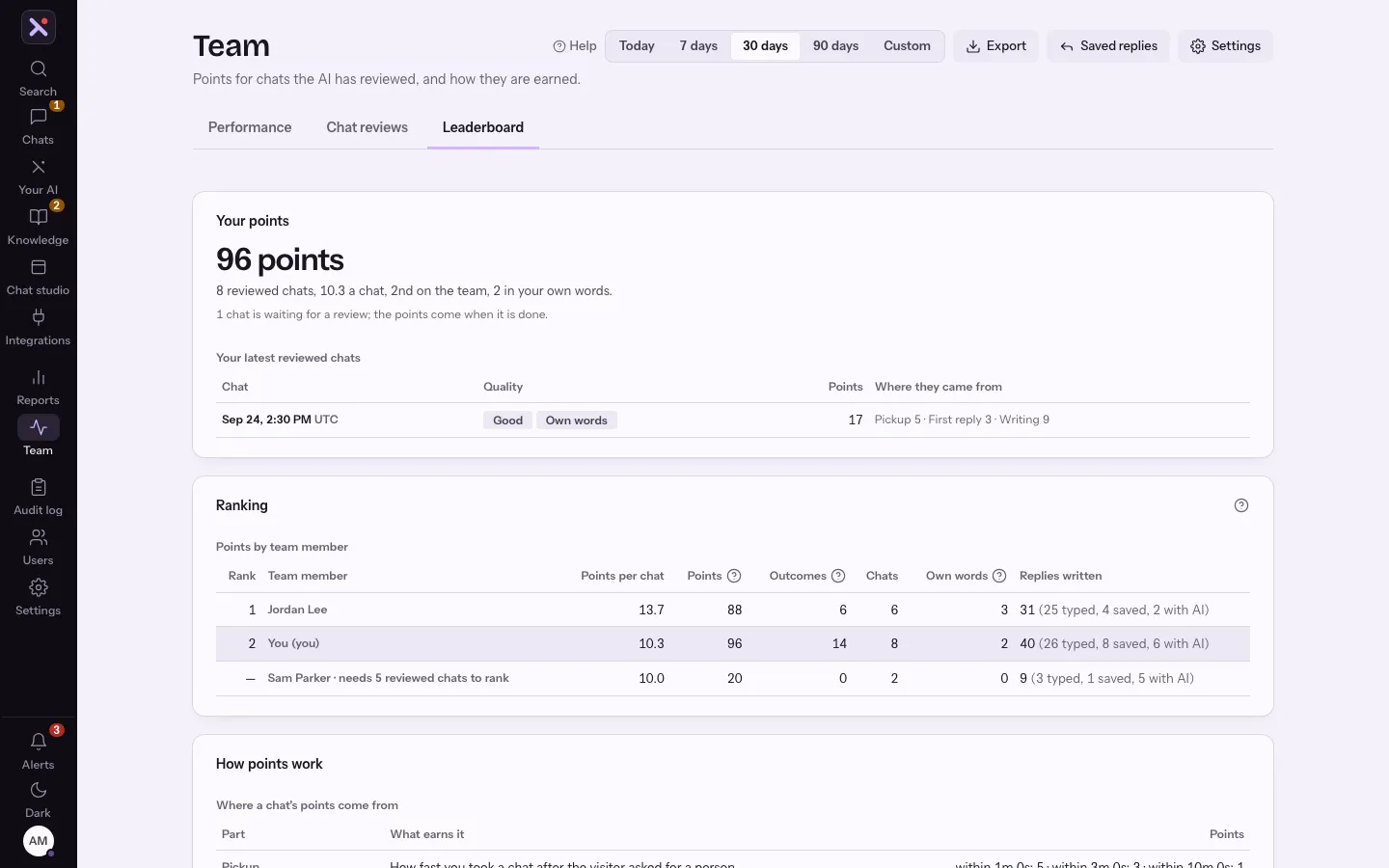
Section titled “Where to find it”Insight, Team, tab Leaderboard. Operators, Supervisors and Admins see it while points are on; for an Operator it is the whole Team page. It opens on the last 30 days, and here a chat counts in the period it closed in.
An Admin sets three switches: press Settings at the top right of the Team page, open Points, change them and press Save changes (Coaching):
| Setting | Does |
|---|---|
| Award points | Turns points and the Leaderboard on or off. Off: points are still worked out and kept, and Team performance still shows them |
| Show the leaderboard to everyone | Off: each Operator sees only their own points. Supervisors and Admins always see the ranking |
| Bonus points outside team hours | Adds points for a chat taken outside your team hours |
Your points
Section titled “Your points”Your total, with a line such as “9 reviewed chats, 3.1 a chat, 2nd on the team, 4 in your own words.” When chats you replied in are still waiting for a review, a line says the points come when it is done.
Your latest reviewed chats lists up to 20, each with when it closed, its quality (and Own words where it applies), its points and Where they came from, such as “Pickup 5 · First reply 3 · Writing 10”, or “No points”. Use it to see which chats earned little, then press the chat’s date to open it and read its review for why.
Earn more points
Section titled “Earn more points”- Be Available when you can answer, with your alerts on, so you take a waiting chat within the first minute (Your preferences).
- Write your first message straight after taking the chat.
- Answer the question, give a next step, and promise only what you can keep: the five ratings are where most points come from.
- Read What to do better in your chat reviews: each point comes with a better wording (Chat reviews).
The ranking
Section titled “The ranking”One row per team member with a reviewed chat in the period; yours is marked “(you)”.
| Column | Means |
|---|---|
| Rank | Ordered by points per chat, highest first. A team member needs a minimum of reviewed chats to be ranked (the page names it, usually 5); below it the rank is “—” and the row says how many are needed |
| Points per chat | Points without the outcomes, divided by reviewed chats |
| Points | The total, outcomes included |
| Outcomes | Points from a contact won or a record sent. In the total, not in the rank, because the visitor decides them as much as you do |
| Chats | Reviewed chats that closed in the period |
| Own words | Chats rated good where every message was typed or a saved reply. A badge, not points |
| Replies written | Messages sent, split into typed, saved and with AI. AI use is shown, never scored |
How points work
Section titled “How points work”The How points work card on the page shows the values in force for your company. They start as:
| Part | Earned when | Points |
|---|---|---|
| Pickup | You took a chat soon after the visitor asked for a person | within 1 minute: 5 · 3 minutes: 3 · 10 minutes: 1 |
| First reply | You wrote your first message soon after taking the chat | within 1 minute: 3 · 3 minutes: 2 · 10 minutes: 1 |
| Writing | The AI’s five ratings of your replies: good 2, mixed 1, poor 0 | up to 10 |
| After hours | You took the chat outside your team hours. Listed only while the bonus is on | 5 |
| Contact won (outcome) | The visitor left contact details after you took the chat | 2 |
| Record sent (outcome) | The chat’s record was sent to your CRM or your own system | 3 |
- Pickup, first reply and after hours count only when the chat is rated mixed or better and the visitor wrote back after your first reply.
- Pickup needs a request for a person that your takeover answered; stepping in unasked earns none.
- Contact won needs contact details that were not already on file when you took the chat.
- A chat where you sent fewer messages than the review minimum earns nothing.
- When two team members replied in a chat, each gets its outcome points in full.
- Points are fixed when the chat is reviewed. A later settings change does not alter them; Review again on a chat works them out afresh.
If something goes wrong
Section titled “If something goes wrong”| What you see | What to do |
|---|---|
| “Points are switched off.” | An Admin presses Open the setting and turns on Award points |
| “The ranking is hidden for the team. Your own points are above.” | An Admin has turned off Show the leaderboard to everyone |
| “No reviewed chats in this period yet.” | Points appear once the AI has reviewed a chat you replied in. Choose a longer range, or see Chat reviews |
| No Leaderboard tab | Points are off, or your company does not use Talk to a person |
Related
Section titled “Related”Reviewed
Source files for this page
services/api/app/settings/features.pyapps/dashboard/src/views/LeaderboardView.tsxapps/dashboard/src/views/operatorReviewCopy.tsapps/dashboard/src/pageTabs.tsservices/api/app/reports/operator_review_facts.pyservices/api/app/reports/operator_quality_store.pyservices/api/app/routers/operator_reviews.pyconfig/deployment.toml

