Teach your AI
Knowledge, Test and fix
Who can open itViewer: noOperator: noSupervisor: noAdmin: yes
Use Test and fix to check an answer before a visitor asks, find out why it is wrong, and fix it from the same place.
Where to find it
Section titled “Where to find it”Work, Knowledge, then the Test and fix tab. Only an Admin can open it. Ask it a question, on the card a new company sees once its website is read, also opens it.
Ask a question
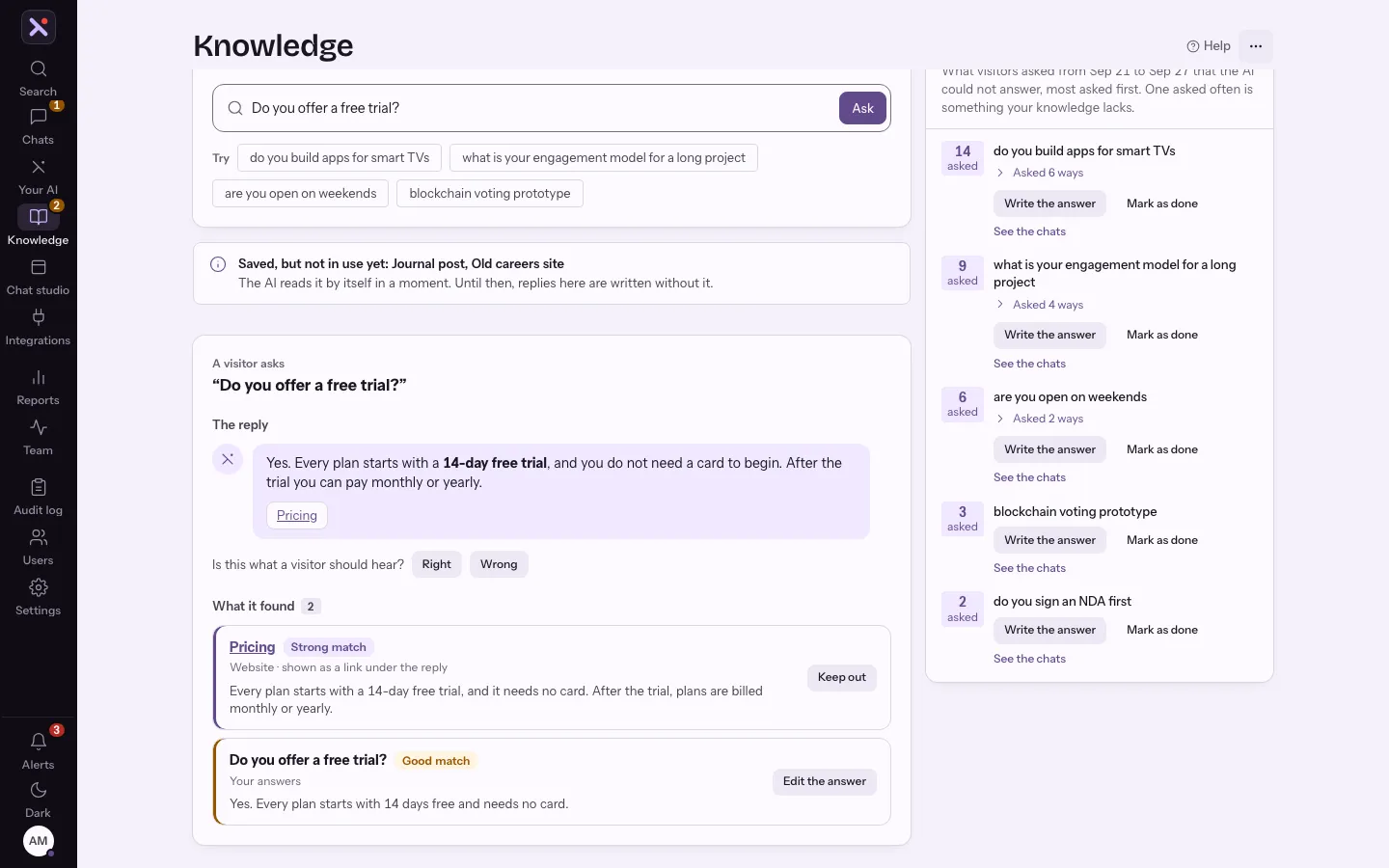
Section titled “Ask a question”- Type a question under “Ask what a visitor might”, up to 300 characters, and press Ask. Or press one of up to four questions offered beside Try: the ones visitors could not get answered last week, then common ones such as “How much does it cost?”.
- Read The reply: the answer a new visitor would get, with the links the chat would show under it. If the AI would not answer this kind of message from your knowledge, you see the fixed reply a visitor would get, marked “A fixed reply”.
- Under it, What it found lists each piece of your knowledge the AI found, with where it came from and the text itself. An answer you wrote that fits comes first.
Each piece under What it found is marked by how closely it matches the question:
| Mark | Means |
|---|---|
| Strong match | It is clearly about the question |
| Good match | It fits well enough to be used and, when it has a link, to be shown as one |
| Weak match | It only touches the subject. A reply built on weak matches alone is a guess |
A piece marked “shown as a link under the reply” is one of the links a visitor would see. If nothing matches, the tab says “Nothing it knows matches this question.”: write the answer, or add the page or file that has it.
If you saved an answer, a page or a file the AI has not read yet, a note under the question box says “Saved, but not in use yet” and names where, such as Answers. Until the AI has read it, replies here are written without it, so wait until the note goes, usually within a minute, and then ask. If Apply changes automatically is off, the note has Update now: press it first.
The test behaves like a visitor’s first message in a new chat, so it does not show how the AI uses what was said earlier in a chat; for that, use Try it in Chat studio. Each question counts toward your team’s daily AI limit, not your visitors’, so testing never stops visitors being answered. Moving to another tab and back keeps your question and its result.
Fix a wrong reply
Section titled “Fix a wrong reply”Under the reply, “Is this what a visitor should hear?” offers Right and Wrong. Right changes nothing. Wrong says why it probably went wrong, from what the search found:
| It says | The fix it offers |
|---|---|
| “Nothing it knows covers this.” | Write the answer, or Add a page or file, which opens Sources |
| “It found only weak matches, so it is guessing.” | Write the answer, or Add a page or file |
| “It used something wrong or out of date.” | Write the answer, or Correct your business facts (Your business). Also keep the wrong page out below |
To fix a reply with an answer of your own:
- Press Write the answer. The Answers tab opens with the question filled in (Questions and answers).
- Write the answer and press Save answer.
- Press Back to your test. A note says “Waiting to ask” and your question, and the question is asked again as soon as the AI has read your answer, about a minute later. If Apply changes automatically is off, press the Update now in that note first.
Each piece under What it found also has its own fix:
| Where it came from | Button |
|---|---|
| One of your answers | Edit the answer |
| A file | Open files |
| A video you added | Open videos |
| A website page, a Strapi entry or a YouTube video | Keep out: takes it out of answers at once, with Undo. Use again puts it back at the next update |
Questions it could not answer
Section titled “Questions it could not answer”The card beside the question box lists what visitors asked last week that the AI could not answer, grouped by meaning: the ten asked most, most asked first, with the dates of the week it covers. A question asked often is a page, file or answer your knowledge lacks.
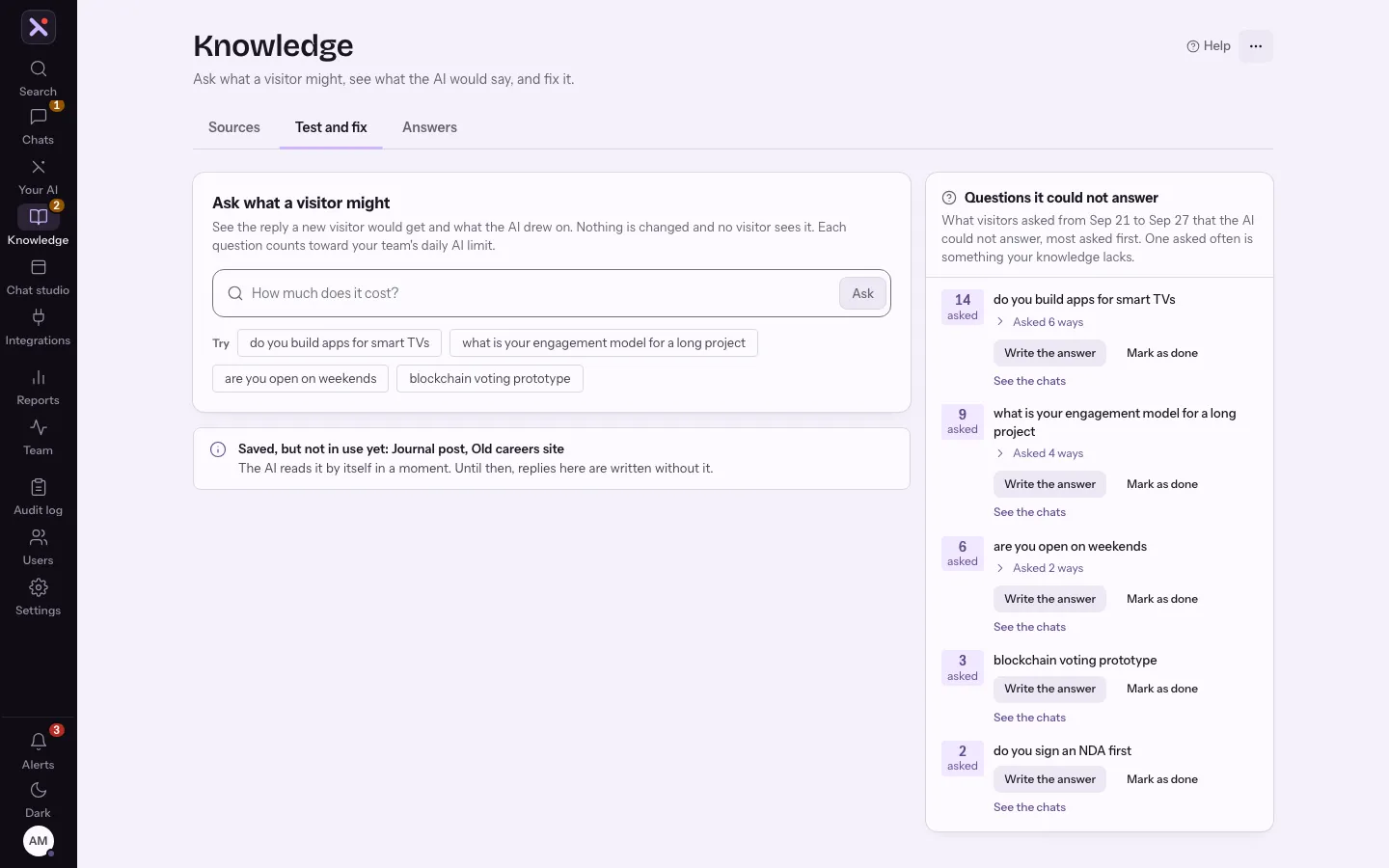
Each row shows how many times it was asked and the wording asked most; “Asked N ways” opens the other wordings.
| To | Press |
|---|---|
| See what the AI says to it now | The wording itself: it is asked in the box |
| Answer it yourself | Write the answer. Saving the answer marks the question as done |
| Take it off your list without an answer, for example after adding a page | Mark as done, with Undo. Put back returns it |
| Read the chats it came from | See the chats: Chats opens, searched for those words |
Up to three of these questions also show in Needs you on Knowledge.
Good to know
Section titled “Good to know”- The list covers the most recent whole week (Monday to Sunday), so it shows last week’s questions, not today’s. For questions from any period, see Answer quality.
- Done is for this week only. A question still asked after your fix comes back next week.
- The questions are kept as long as the chats they came from.
- Keep out here is the same as on a source’s list of what it read (Knowledge).
If something goes wrong
Section titled “If something goes wrong”| What you see | What to do |
|---|---|
| “Too many questions tried. Please wait a moment.” | The search did not run, so nothing new is shown for this question. Wait a minute, then ask again |
| “Too many replies asked for. Please wait a moment.” | Only the reply is paused: what it found is still shown. Wait a minute, then press Try again |
| “Today’s limit for the team’s AI helpers is reached, so the reply here is paused until earlier use is 24 hours old.” | Wait, or read What it found for now. Your plan sets the limit |
| “The search could not run…” or “The reply could not be written…” | Press Try again in a moment. If it keeps happening, tell your platform administrator |
| “No reply to judge?” under what it found | The reply could not be written this time. Write the answer still works |
| The reply does not use the answer you just wrote | The AI has not read it yet, and the note “Saved, but not in use yet” says so. Wait until the note goes, or press Update now in it, then ask again |
| “No unanswered questions grouped yet.” | The first list appears after the first whole week of chats. A week where every question was answered has none |
Related
Section titled “Related”Reviewed
Source files for this page
apps/dashboard/src/views/knowledge/TestTab.tsxapps/dashboard/src/views/knowledge/words.tsapps/dashboard/src/views/knowledge/QueryThemes.tsxapps/dashboard/src/views/knowledge/AnswersTab.tsxapps/dashboard/src/views/KnowledgeView.tsxservices/api/app/knowledge/knowledge_test.pyservices/api/app/knowledge/knowledge_reply.pyservices/api/app/routers/knowledge.pyservices/api/app/knowledge/query_themes.pyservices/api/app/rag/retriever.pydocs/RAG.mdapps/dashboard/src/views/InsightsView.tsx

