See how it's going
Team performance
Who can open itViewer: noOperator: noSupervisor: yesAdmin: yes
Where to find it
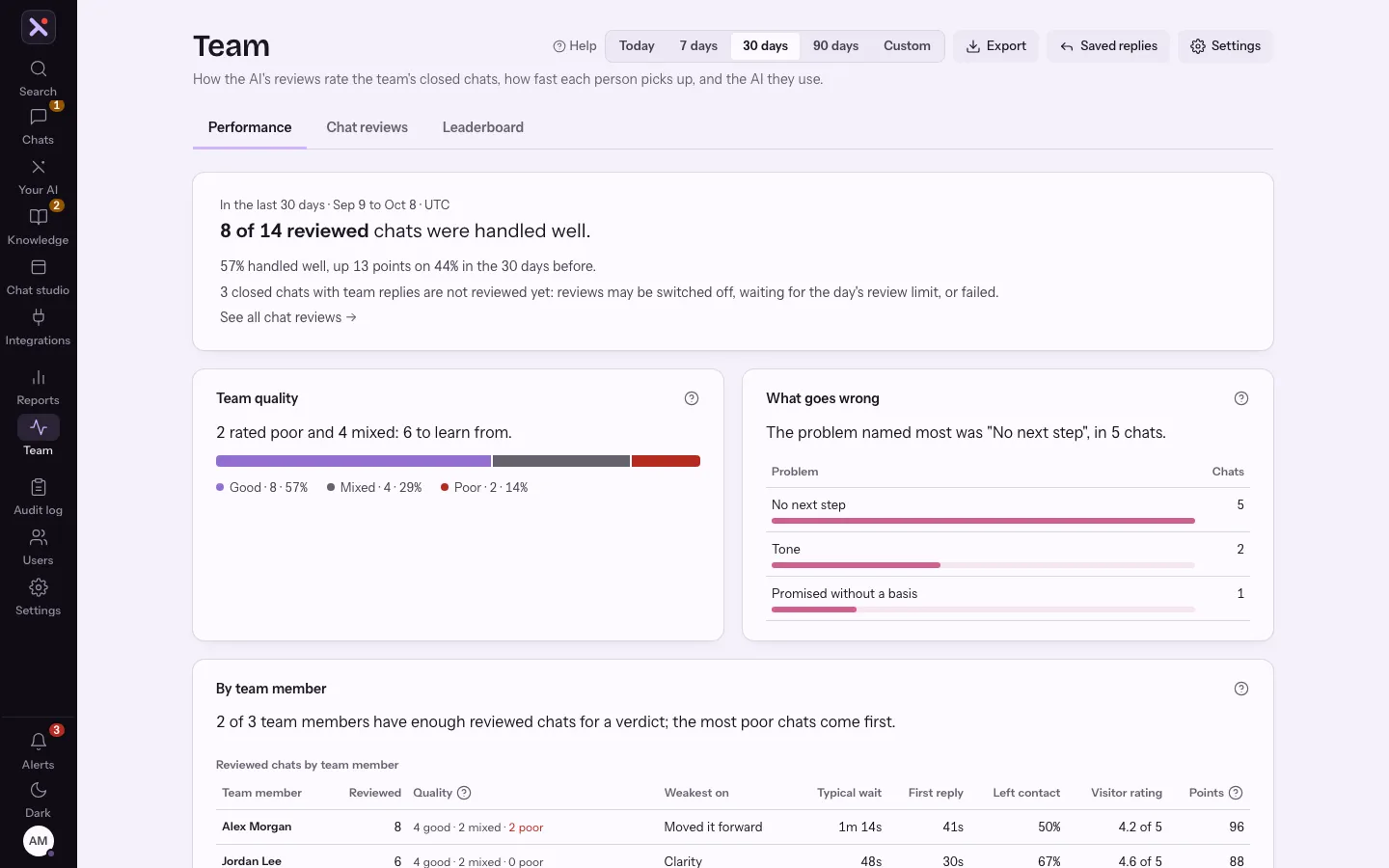
Section titled “Where to find it”Insight, Team, tab Performance. Only Supervisors and Admins see it. It opens on the last 30 days; change the days with the date buttons at the top right (Date range). A chat counts in the period it began in, once it has closed and been reviewed.
How a chat is rated
Section titled “How a chat is rated”The AI rates each team member in a closed chat on five things, each Good, Mixed or Poor: Answered the question, Moved it forward, Tone, Clarity and Kept promises in reach. Fixed scoring turns the five into one quality for that person in that chat. A poor Kept promises in reach keeps a chat from being good, and a visitor who went back to the AI because the team member stayed silent lowers it a step. More on reviews: Chat reviews.
A chat two team members replied in counts once for each of them, with their own rating.
Read it top to bottom
Section titled “Read it top to bottom”- The headline says how many reviewed chats were handled well (“9 of 12 reviewed chats were handled well.”), how the share moved against the period before (“75% handled well, up 8 points on 67% in the 30 days before.”), and how many closed chats are not reviewed yet. See all chat reviews opens Chat reviews on the same days.
- Team quality splits the reviewed chats into Good, Mixed and Poor, with the count and share of each.
- What goes wrong ranks the problems the reviews named, by how many chats had each (below). The top one is your next coaching topic.
- By team member compares people (below).
- Chats to coach from lists the 20 most recent chats that were not good, poor first: when the chat began, the team member, the quality, the review’s summary and the problems named. Press the date to open the chat and read its review and the better wordings.
- Response by team member shows, as a dot on a shared time scale, how long each person typically takes to write their first message after taking a chat. “2 without reply” beside a name counts takeovers they never answered.
What goes wrong
Section titled “What goes wrong”| Problem | The review found that the team member | Coach on |
|---|---|---|
| No next step | Answered but left the visitor with nothing to do next | Ending each reply with a clear next step: a call, a contact, a link |
| Missed the question | Did not answer what the visitor asked | Reading the whole message, and the chat’s summary, before writing |
| Promised without a basis | Promised something they could not be sure of, such as a price or a date | Saying what happens next instead of what will be delivered |
| Tone | Wrote in a way that did not suit the visitor | Wording; saved replies help (Saved replies) |
| Unclear | Wrote something hard to follow | Shorter replies, one point at a time |
| Slow or silent | Kept the visitor waiting, or took the chat and did not reply | Alerts and availability (Your preferences); handing back a chat they cannot answer |
| Other | Something outside the kinds above | Read the review |
By team member
Section titled “By team member”One row per team member with a reviewed chat in the period, most poor chats first. Press a name to open the chats that person took over in the period.
| Column | Means |
|---|---|
| Reviewed | Their reviewed chats in the period |
| Quality | “4 good · 1 mixed · 0 poor”. Below the minimum the card names (usually 5 reviewed chats) it reads “Too few reviewed chats for a verdict” |
| Weakest on | The rating that was lowest on average across their chats: what to coach first. “—” when all were good |
| Typical wait | How long visitors typically waited for each of their replies, counting only while they held the chat |
| First reply | How long they typically took to write their first message after taking a chat |
| Left contact | The share of their reviewed chats where the visitor left an email or phone |
| Visitor rating | The visitors’ average stars for those chats |
| Points | The points those chats earned (Leaderboard and points), shown even while points are off |
Read the counts before the verdict: a person with few reviewed chats can swing on one bad chat, which is why the verdict waits for that minimum. The sentence under the card’s title says how many people have enough reviewed chats.
Act on what you find
Section titled “Act on what you find”| You see | Do |
|---|---|
| One problem leads What goes wrong | Make it the team’s coaching topic. Filter Chat reviews by that Kind of problem for chats to show as examples |
| One person has most of the poor chats | Read their chats in Chats to coach from, then talk through the Weakest on rating with them |
| A long First reply or “without reply” for one person | Check they get alerts and set themselves Away when they cannot answer |
| “Too few reviewed chats for a verdict” for most people | Choose a longer range, or lower Only review chats with at least (Coaching) |
| Closed chats not reviewed yet | Review them by hand under Not reviewed yet on Chat reviews |
This tab shows counts and reasons and ranks nobody. Export here holds Print or save as PDF only.
If something goes wrong
Section titled “If something goes wrong”| What you see | What to do |
|---|---|
| “No chat has been reviewed in this period.” | Choose a longer range, or check that AI coaching on closed chats is on (Coaching). Only chats with enough team replies are reviewed |
| “Nobody took a chat over in this period.” under Response by team member | No team member took a chat in these days. Choose a longer range |
| No Team in the menu | You are a Viewer, or an Operator while points are off, or your company does not use Talk to a person (Team) |
| “3 closed chats with team replies are not reviewed yet …” | Reviews may be off, waiting for the day’s review limit, or failed. Review them by hand under Not reviewed yet on Chat reviews |
| “Nothing reviewed earlier to compare with.” | The period before has no reviews, so there is no change to show |
| A second message in red with Try again lower down | Only the response times failed to load; the reviews above are still right |
Related
Section titled “Related”Reviewed
Source files for this page
apps/dashboard/src/views/OperatorQualityView.tsxapps/dashboard/src/teamFindings.tsapps/dashboard/src/views/operatorReviewCopy.tsservices/api/app/reports/operator_quality_store.pyservices/api/app/reports/operator_review_facts.pyservices/api/app/reports/analytics_store.pyconfig/deployment.tomlshared/web/src/views/reports.tsxshared/web/src/reportFindings.ts

