See how it's going
Date range, comparisons and export
Who can open itViewer: yesOperator: yesSupervisor: yesAdmin: yes
Choose the days
Section titled “Choose the days”The buttons at the top right of each report read Today, then 7, 30 and 90 days, then the longest your company keeps (never more than 365), then Custom. A button longer than what is kept is not offered.
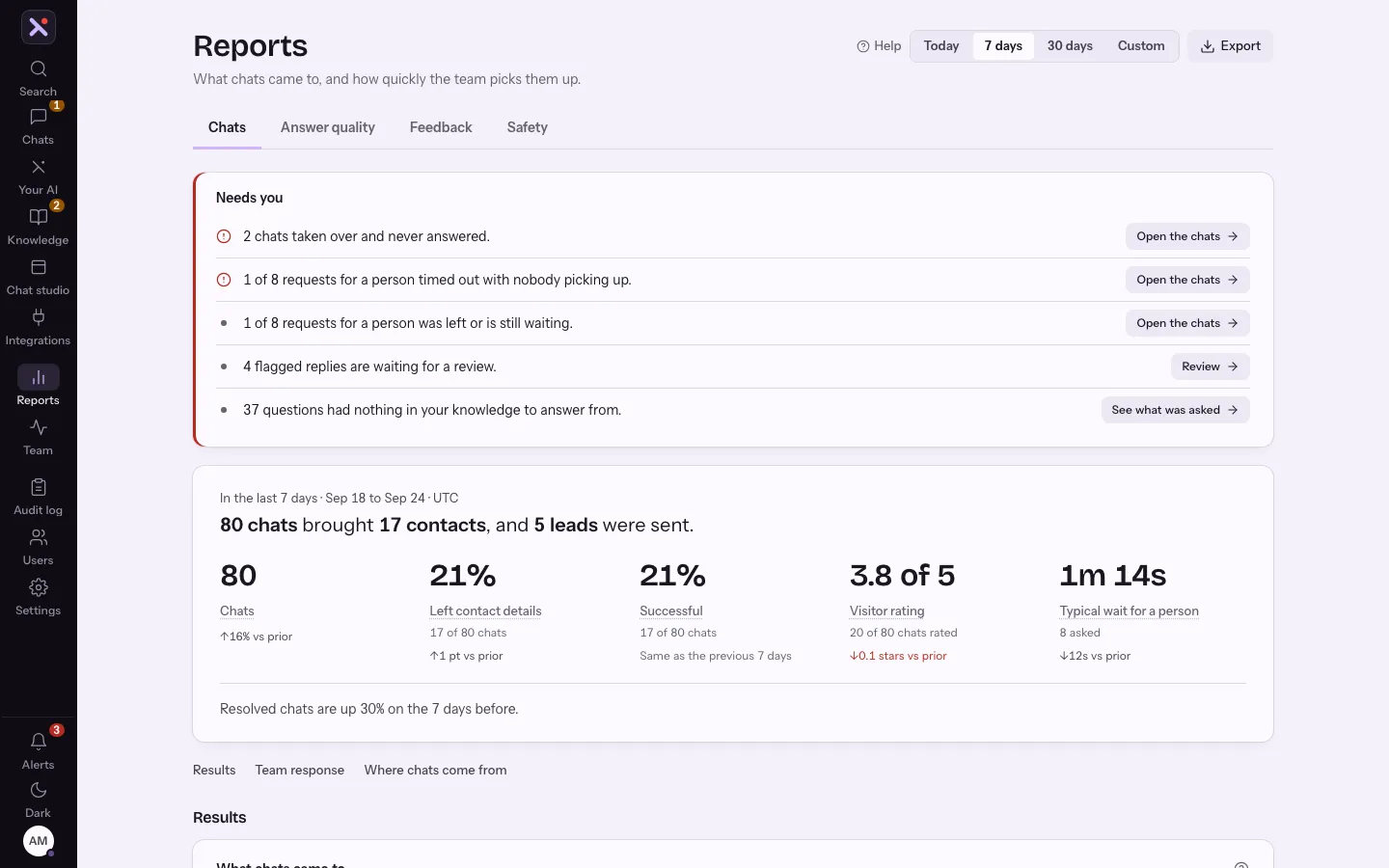
- Today is your team’s day so far. Its period line adds “Updated 2m ago” and Refresh, which reads the figures again.
- Custom opens From and To, starting from the days already on the page. Pick any run of days from the oldest kept day to today; From cannot be later than To.
- Reports opens on the last 7 days. The Team tabs open on the last 30, because a person’s verdict needs more chats than one week holds.
- Switching tabs keeps your range, and the range is in the page’s address. To show a colleague the same view, copy the address from your browser and send it: it opens the same days, and on Chats the same source, page, country or audience.
- The Audit log has the same date buttons.
Days run midnight to midnight in your company’s time zone; hover over the buttons to see which. A chat counts in the day it started, except where a report says otherwise.
The period line
Section titled “The period line”Over each headline a line says what the figures cover, for example “In the last 7 days · 28 Oct to 3 Nov · IST”. Read it when a range was cut short: the line shows the days actually counted.
What each report keeps
Section titled “What each report keeps”| Report | The longest range is |
|---|---|
| Chats, Answer quality, Feedback, the Team tabs | How long chats are kept: Keep chats for (Data retention) |
| Safety | How long what visitors send is kept, which the platform sets for your company |
Read the arrows
Section titled “Read the arrows”Most figures carry a small line comparing them with the same number of days just before. When the range ends today, the earlier run stops at the same time of day, so a morning is never set against a whole day. Today is compared with yesterday up to this time.
| You see | It means |
|---|---|
| “↑21% vs previous 7 days” | A count rose by that share. “↑New” when the earlier count was 0 |
| “4 → 5 vs previous 7 days” | The earlier count was under 10, so both counts are shown instead of a share. Never coloured |
| “↓1 pt vs previous 7 days” | A rate moved by that many percentage points |
| “↓0.1 stars”, “↓45s” | An average or a time moved by that much |
| “Same as the previous 7 days” | The move rounds to nothing |
A fall is good news for AI replies flagged and Typical wait for a person; a rise is good news for the others. AI replies per chat is never coloured.
When the earlier run would reach past what is kept, or before your first chat, there is no comparison and the arrows are left out. The headline then says “Nothing earlier to compare with”. A new company, or a range as long as what is kept, will see this.
Export
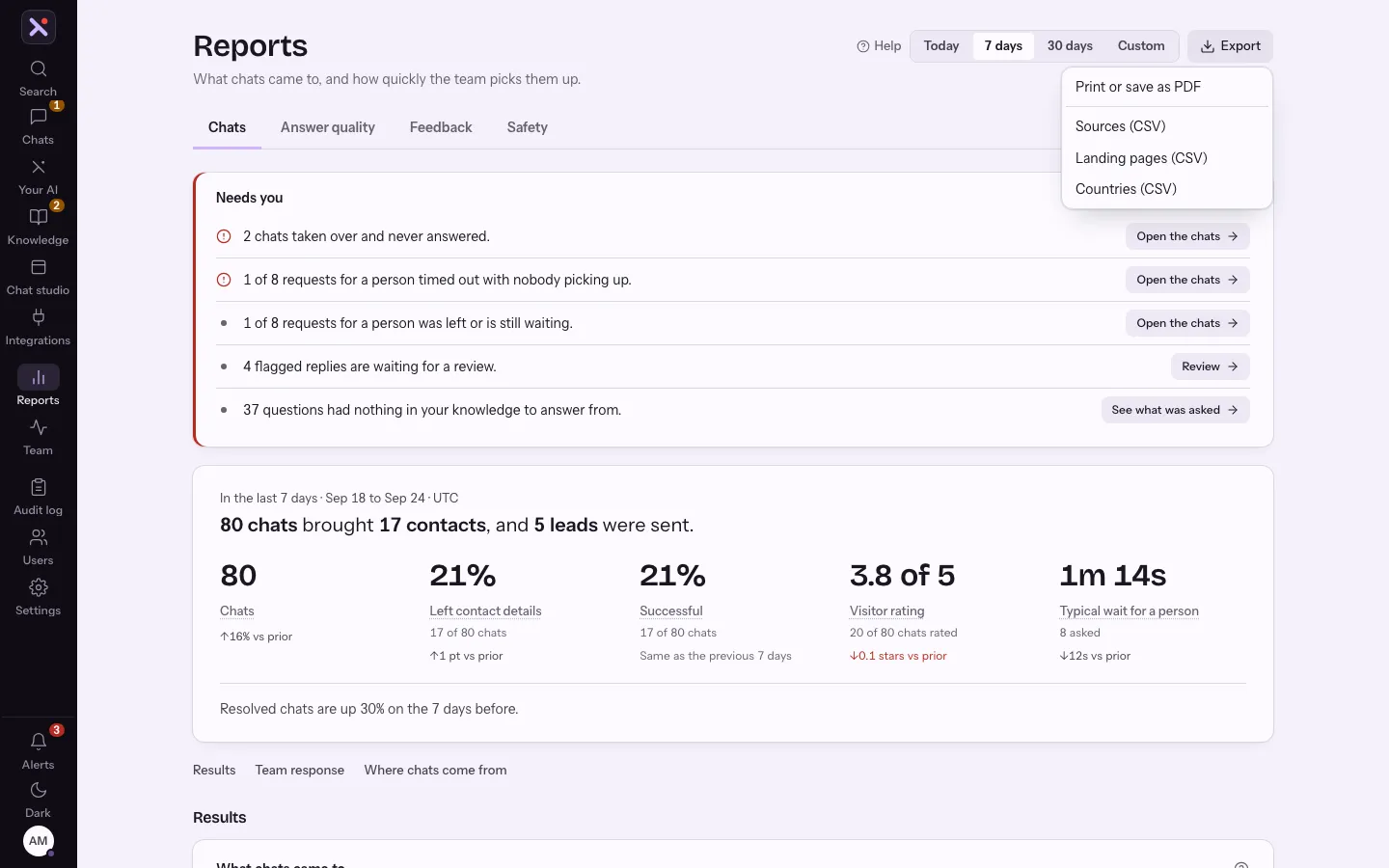
Section titled “Export”Export, beside the date buttons, holds Print or save as PDF for everyone and, for Operators, Supervisors and Admins, one spreadsheet file per table, each named with “(CSV)” after it. A Viewer sees only the print entry.
| Report | Spreadsheet files |
|---|---|
| Chats | Sources, Campaigns (once a link has named one), Landing pages, Countries |
| Answer quality | Unanswered questions, Most-shown sources, Off-topic chats |
| Feedback | Ratings, Flagged replies |
| Safety | Blocked and muted visitors, Visitors turned away most |
| Team tabs | None: print only |
Print a report or save it as a PDF
Section titled “Print a report or save it as a PDF”- Choose the days.
- Press Export, then Print or save as PDF. Your browser’s print dialog opens.
- Choose your printer, or “Save as PDF” as the destination, and print.
The page prints in the light theme, without the buttons, laid out as it is on your screen, with a line naming the period and when the figures were read. The PDF is named after the report and its days.
Save a table as a spreadsheet file
Section titled “Save a table as a spreadsheet file”- Choose the days.
- Press Export, then the table’s name, for example “Ratings (CSV)”. The file downloads at once.
- Open it in your spreadsheet program.
| File | Columns |
|---|---|
| Sources, Campaigns, Landing pages | The source, campaign or page, Chats, Left contact details and, where a record can be sent, the records sent |
| Countries | Country, Chats |
| Unanswered questions | What the visitor asked, how often, when last |
| Most-shown sources | Source, its kind, Shown, Opened |
| Off-topic chats | The visitor’s last message, the number of off-topic questions, the last activity |
| Ratings | Stars, reasons, comment, how the chat began, when it was rated |
| Flagged replies | What the visitor asked, what the AI replied, reasons, comment, when it was flagged, who reviewed it |
| Blocked and muted visitors | Visitor, status, reason, who set it, when, until when |
| Visitors turned away most | Visitor, sent too fast, refused, status |
- A file holds counts rather than the shares on screen, so your spreadsheet can work out its own. Its name says which days it covers.
- A table that shows its ten largest rows saves those and one “Other” row, and its name says “top-10”.
- What a visitor wrote is saved as text: a cell that would run as a formula in a spreadsheet is written so that it cannot.
- Ratings and Flagged replies hold every row of the period whatever the filters on screen, with what visitors wrote. The Chats files hold what the report shows, so a narrowed report saves narrowed tables.
- A visitor is written as a short label such as “#a1b2c3d4”, never their network address.
If something goes wrong
Section titled “If something goes wrong”| What you see | What to do |
|---|---|
| A message in red with Try again | The figures did not load. Press Try again; if it keeps failing, check your connection |
| “Could not read Ratings to save it.” | The file could not be gathered, often a lost connection. Try again |
| A longer button you used before is missing | Your company now keeps chats for fewer days, so a longer range is not offered |
| A shared link opens other days than you expected | The link named a range that is no longer kept, or a number of days that has no button; the report then opens on its usual range, or on the longest one still kept |
| No spreadsheet files in Export | You are a Viewer. Ask an Operator, Supervisor or Admin for the file, or print the report |
Related
Section titled “Related”Reviewed
Source files for this page
apps/dashboard/src/views/ReportRangeControl.tsxshared/web/src/reportRange.tsapps/dashboard/src/useReportRange.tsshared/web/src/reportDelta.tsshared/web/src/views/reports.tsxapps/dashboard/src/views/ReportPrint.tsxapps/dashboard/src/views/AnalyticsView.tsxapps/dashboard/src/views/InsightsView.tsxapps/dashboard/src/views/FeedbackView.tsxapps/dashboard/src/views/SafetyView.tsxapps/dashboard/src/permissions.tsservices/api/app/reports/report_window.py

