See how it's going
Safety
Who can open itViewer: yesOperator: yesSupervisor: yesAdmin: yes
A visitor appears on this tab only as a short label, such as “#a1b2c3d4”, made from a scrambled form of their network address, never the address itself. Everyone on one network, such as an office, shares one label.
Where to find it
Section titled “Where to find it”Insight, Reports, tab Safety. Every role can open it. Operators, Supervisors and Admins can save Blocked and muted visitors and Visitors turned away most as spreadsheet files (Export).
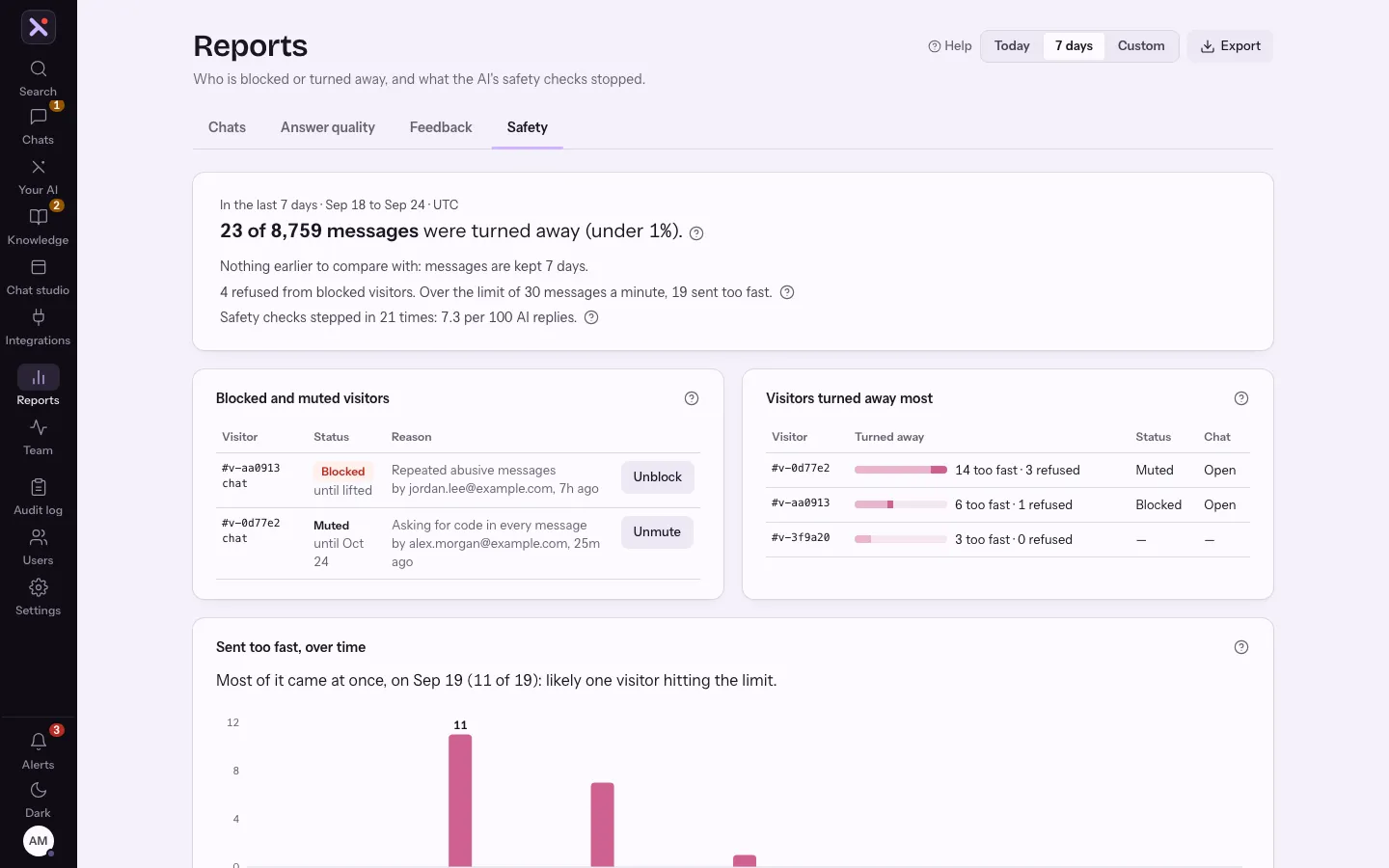
The longest range here is how long what visitors send is kept, which the platform sets and can be shorter than how long chats are kept. With 7 days kept, the 7-day range has nothing to compare with; choose Today to compare with yesterday.
Read the headline
Section titled “Read the headline”The sentence says how many messages were turned away: “12 of 900 messages were turned away (1%).” A message here is anything a visitor sends: starting a chat, a message, a file or a voice recording. One is turned away in two ways:
| Turned away as | Means |
|---|---|
| Sent too fast | The visitor sent more messages in a minute than your limit allows. They are asked to wait and can try again a moment later. The limit is in Visitor limits |
| Refused | The visitor is blocked. They are answered as if the chat had ended, so the block is not advertised |
A few per cent turned away is ordinary. A large share, or a sharp rise against the period before (marked red), means an attack or a limit set too low for real visitors. The notes under the sentence say:
- how the count moved, for example “Up 40% on the 7 days before (12).” or “Much the same as the 7 days before (12).”;
- how many were refused from blocked visitors, and how many were sent too fast over your limit (“Over the limit of 20 messages a minute, 9 sent too fast.”). When the limit is switched off the note says so;
- how often the safety checks stepped in: “Safety checks stepped in 14 times: 2.1 per 100 AI replies, up from 1.4”, or “No safety check had to step in.”
| What you see | Likely cause | What to do |
|---|---|---|
| Under 1% to a few per cent, steady | Ordinary traffic | Nothing |
| A sharp rise, mostly “sent too fast”, from one or two visitors | One visitor or a program hammering the chat | Open their chat from Visitors turned away most and block them (Mute and block) |
| “Sent too fast” spread across many ordinary visitors | Your per-visitor limit is too low | An Admin raises it in Visitor limits |
| Mostly “refused” | Blocked visitors trying again | Nothing: the block is working |
| Many automated chats starting | No bot check | An Admin turns on the bot check (Connect the bot check) |
Blocked and muted visitors
Section titled “Blocked and muted visitors”Every block and mute in force now, newest first, whatever the dates you chose. Each row shows the visitor, a link to the chat it was set from, Blocked or Muted with when it ends (“until lifted” for a block), the reason, and who set it and when. With none, the card reads “Nobody is blocked or muted.”
| Effect on the visitor | Who sets it, from a chat | |
|---|---|---|
| Block | The chat is closed to them and any new one is refused from their network, until someone lifts it | Supervisor or Admin |
| Mute | Their chat works as normal, but your team is not alerted about it. It ends on its own | Operator, Supervisor or Admin |
To lift one:
- Find the visitor in the list. Press chat beside the label to read why they were blocked or muted.
- A Supervisor or Admin presses Unblock or Unmute.
- It takes effect at once: a message says “Visitor unblocked” or “Visitor unmuted”, the row leaves the list, and the change is recorded in the Audit log.
An Operator lifts a mute from the chat instead. How to block or mute: Mute and block.
Visitors turned away most
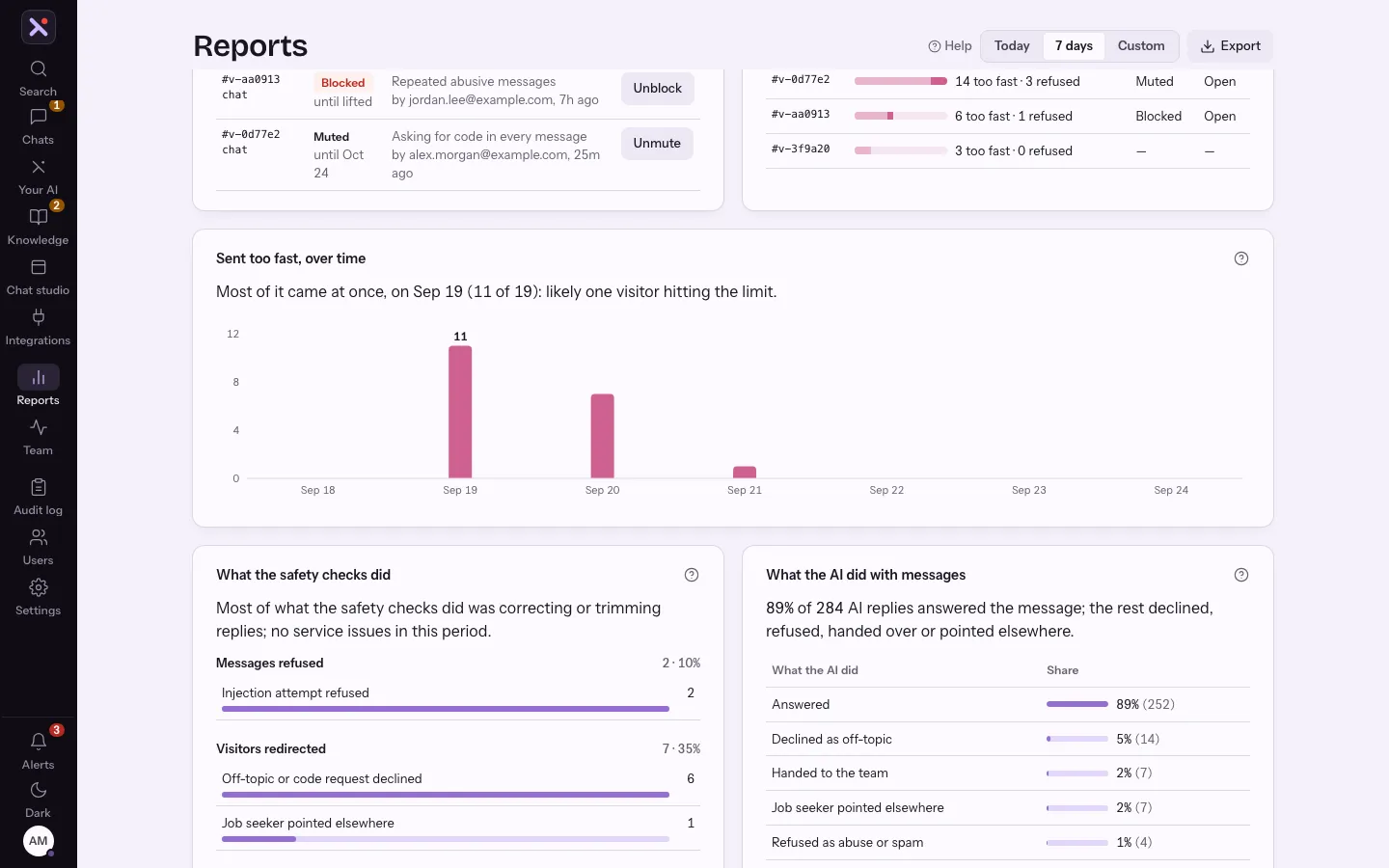
Section titled “Visitors turned away most”The ten visitors turned away most in the period, with how many messages were too fast and how many refused (“9 too fast · 3 refused”; in the bar, the paler part is too fast and the stronger part refused), and their status now (a mute or block that has ended no longer shows). Open opens their latest chat, where you can block or mute them. A visitor with no chat only sent messages too fast.
Sent too fast, over time shows when it happened, by hour for a one- or two-day range and by day otherwise. Its sentence tells you the pattern: one burst is likely one visitor hitting the limit; a steady run through the period is worth blocking whoever keeps hitting it.
What the safety checks did
Section titled “What the safety checks did”The AI’s safety checks stop or correct messages and replies. The card groups what they did under four headings, each with its checks ranked by how often they stepped in:
| Heading | What the checks did |
|---|---|
| Messages refused | Refused a visitor’s message: too long, sent while the AI was still answering, an attempt to rewrite the AI’s instructions |
| Visitors redirected | Declined an off-topic message or a restricted topic, refused abuse or spam, or pointed one of your audiences elsewhere |
| Replies corrected | Replaced or trimmed something in a reply the AI should not have written, such as a price your answer settings do not allow, an unsupported figure, an untrusted link, or how a visitor’s details are kept while How data is handled is at its default |
| Service issues | Something went wrong on the way: a message could not be checked, or a message limit or a daily AI limit was reached and the visitor was answered without the AI. Red whenever it is not none |
Look at Service issues first: anything there means visitors did not get the AI’s answer. It is always shown, and reads None when all is well.
| Under Service issues | Means | What to do |
|---|---|---|
| A message could not be checked | The check of one visitor message did not complete, so the chat answered that message more carefully: its simpler fallback checks, a reply that declines any part about the AI’s instructions, and a fixed reply in place of any answer the second reading flags | Occasional ones need nothing. Many in one day: tell your EveryKnock contact |
| Daily limit reached | Your plan’s daily AI limit was reached, so visitors were answered without the AI until earlier use aged out | See Limits and abuse controls and Control use and abuse |
| Record lookup your system did not answer | The AI tried to look a visitor’s record up in your own system and got no answer | Check the connection on Integrations (Connect record lookup) |
Each check is named in plain words, such as Reply with a price replaced, Untrusted link removed or Restricted topic declined, with how many times it stepped in. The smallest ones are added up as Other. What each check is for: How replies are checked.
What the AI did with messages, beside it, splits every AI reply in the period by what the AI did. Most replies should be answers; the sentence under the title gives that share.
| Row | The AI |
|---|---|
| Answered | Answered the visitor’s message |
| Answered with a notice | Answered, and added the notice you set for a restricted topic |
| Declined as off-topic | Said the question is outside what the chat helps with. Many of these for questions you do want answered: widen the topics on Your AI |
| Declined as a restricted topic | Declined a topic you restricted |
| Refused as abuse or spam, Refused as an injection attempt | Refused the message. An injection attempt is a message that tries to rewrite the AI’s instructions |
| Handed to the team | Passed the visitor to your team because they asked for a person |
| Given the contact for the team | Gave your team’s contact details because nobody was free to take the chat |
| “Job seekers pointed elsewhere” | Pointed one of your audiences elsewhere with the reply you wrote for them (Who writes) |
Safety checks by week
Section titled “Safety checks by week”How often the checks that correct a reply stepped in, per 100 AI replies, for each of the last eight weeks whatever range you chose. Every row shares one scale, so a tall bar is a check that steps in often. Point at a week to read it. A falling rate after you change Your AI means the change helped.
If something goes wrong
Section titled “If something goes wrong”| What you see | What to do |
|---|---|
| Many messages sent too fast from ordinary visitors | Your per-visitor limit may be too low. An Admin raises it in Visitor limits |
| One label at the top of Visitors turned away most every day | Open their chat and block them |
| A red line such as “Blocked visitor not found.” after Unblock | Someone else lifted it already. Reload the page |
| The list shows a message in red with Try again | The list did not load; nothing is said about who is blocked until it does. Press Try again |
| “Nothing earlier to compare with: messages are kept 7 days.” | The period before is no longer kept. Choose Today to compare with yesterday |
| Service issues is red | Read the table under What the safety checks did |
| “No safety check had to step in during this period.” | Nothing to do: no message or reply needed stopping |
Related
Section titled “Related”Reviewed
Source files for this page
apps/dashboard/src/views/SafetyView.tsxapps/dashboard/src/views/PerformanceView.tsxapps/dashboard/src/pageTabs.tsapps/dashboard/src/views/GuardTrend.tsxapps/dashboard/src/views/guards.tsxshared/web/src/reportFindings.tsapps/dashboard/src/permissions.tsservices/api/app/visitors/abuse.pyservices/api/app/reports/analytics_store.pyservices/api/app/reports/security_events.pyservices/api/app/routers/abuse.pydocs/SECURITY.mdapps/dashboard/src/analyticsHeadline.tsshared/web/src/views/reports.tsx

