Your chat on your website
Errors and notices
Who can open itViewer: yesOperator: yesSupervisor: yesAdmin: yes
Use this page when a visitor, or someone on your team, reports a message they saw in the chat. Each table says what the message means and what the visitor, or an Admin, can do.
A message did not go through
Section titled “A message did not go through”The message stays in the chat with a line under it and Retry. Retry never sends a message twice, and a new message that repeats an earlier one word for word (a second “yes”) is answered like any other. Under the message the chat says “Not delivered” (it never arrived), “No reply yet” (it arrived, the reply did not) or “Waiting to send” (it goes by itself once the browser is back online). A message that never arrived also comes back in the message box after a reload.
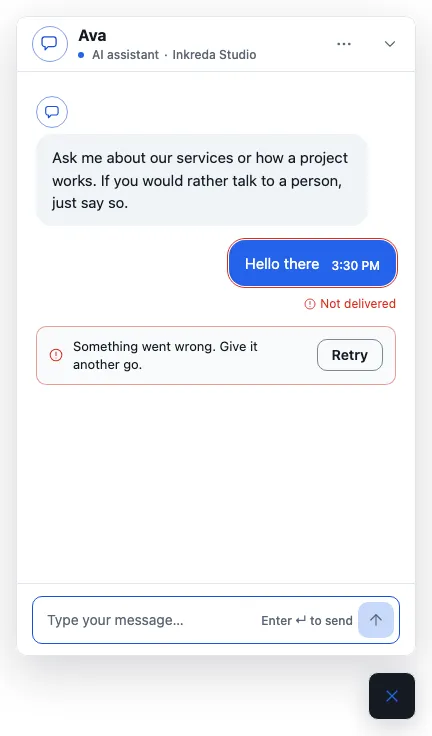
| The visitor sees | What it means | What to do |
|---|---|---|
| “Something went wrong. Give it another go.” / “That didn’t go through. Give it another go.” | A failure on the way | The visitor presses Retry |
| “Couldn’t reach the assistant. Give it another go.” | The chat could not reach EveryKnock, usually the visitor’s connection | Retry |
| “I took too long on that one. Please try again.” | The reply did not arrive in time | Retry, which first checks whether the reply finished |
| “The assistant is unavailable right now. Please try again.” | The AI service failed, and no backup AI that passed the same checks could answer. The message is kept | Retry. If many visitors report it, tell your platform administrator |
| “You’re offline. Your message will send when you’re back online.” | The browser is offline | Nothing: it sends by itself |
| “Your message came through, but it didn’t get a reply. Press Retry to try again.” | A visitor came back to a chat whose last message got no answer | Retry |
| “The assistant is still answering that message. The reply will appear here when it is ready.” | Retry was pressed while the first try was still being answered | Wait: the reply appears by itself |
| “Sorry, I didn’t quite catch that — could you rephrase?” | The AI had no reply to give | The visitor asks again in other words |
Too many messages
Section titled “Too many messages”| The visitor sees | What it means | What to do |
|---|---|---|
| “Easy there. You can send again in 1:45.” | Under the box: sends are held for that long, counting down | Wait for the countdown |
| “You’re sending messages too quickly. Please wait a moment and try again.” | Too many messages in a minute. The text goes back in the box | Wait a moment and send again |
| “You’ve sent a lot of messages in the last hour. Please try again in a minute.” | While the chat is waiting for your team or a team member has it: the visitor reached the hourly limit. With the AI answering, the reply below comes instead | Wait, or your team replies in the chat |
| “That message is too long. Please shorten it and try again.” | Over the length a message may have | Send it in parts |
| “You’ve started several new chats in a short time, so I can’t chat live in another one for the moment…” | A new chat’s first message from a visitor (one network address) who has started more chats this hour than New chats an hour, per visitor allows. The contact card follows when a contact field is on. The chat stays open | The visitor leaves their details, or tries later. Many people behind one office network count as one visitor: raise the limit if real visitors meet it |
| “You’ve sent a lot of messages in a short time, so I can’t chat live for the moment…” | A reply in place of an answer, with the contact card: this visitor reached a limit | The visitor leaves their details; your team can still take the chat over |
| “We’re getting a lot of interest right now, so I can’t chat live at the moment…” | The same, when a limit on all your visitors together, or a daily AI limit of your plan, is reached | The visitor leaves their details and your team follows up. An Admin reviews the limits (Control use and abuse) |
Your limits are on Visitor limits; the limits on all visitors together are your plan’s (Limits and abuse controls).
Session and website
Section titled “Session and website”| The visitor sees | What it means | What to do |
|---|---|---|
| “Your session expired, so we have started a new conversation. Your last message was not sent; send it again when you are ready.” | The chat started again, for example because it had no activity for 30 days. The unsent text is back in the box | The visitor sends it again |
| “That conversation has expired, so we have started a new one.” | EveryKnock no longer has that chat, or no longer accepts it after 30 days without activity | Nothing: the visitor carries on in the new chat |
| “We couldn’t load your earlier messages. Reload the page to try again.” | A returning visitor’s chat could not load | Reload the page |
| “This session has ended.” | A message sent to a chat that had already ended, or from a visitor your team blocked | Start a new chat. A blocked visitor stays blocked (Mute and block) |
| “Chat is not available on this website.” | The website was removed from your allowed websites while the chat was open | An Admin lists the website again (Where it runs) |
| “We couldn’t verify your browser. Please try again.” | The bot check could not run, often because of a content blocker. The chat then offers the contact card: “A blocker can stop the browser check. You can still reach our team here.” | The visitor tries again, pauses the blocker, or leaves their details |
| “Chat is not available right now. Please try again later.” | The bot check is on, but its keys are missing | An Admin puts the keys right or switches the check off (Connect a bot check) |
Window and launcher
Section titled “Window and launcher”| The visitor sees | What it means | What to do |
|---|---|---|
| “Loading your conversation…” | A returning visitor’s chat is loading | Nothing |
| “Chat unavailable — try again” on the button | The chat could not load | Press the button to try again. If it stays, your web developer checks the website’s security policy (Security policy and browsers) |
| “Chat unavailable” on the button, or “Chat is unavailable right now. Reload the page to try again.” | The page holds an older copy of the chat than the one just released | Reload the page |
| “Chat is unavailable right now.” with Try again | An inline chat could not load | Try again |
A browser too old for the chat shows no button at all; the rest of the page works as before (Browser support).
When the chat’s settings do not arrive at all (EveryKnock cannot be reached, the site key is wrong, or the website is not listed), nothing is drawn and the page is left as it was. Your web developer can put a message for that case inside the chat’s code: When the chat cannot be drawn.
Warnings under the message box
Section titled “Warnings under the message box”A line with Dismiss for something the visitor tried that did not work.
| The visitor sees | What it means | What to do |
|---|---|---|
| “Didn’t catch anything. Try again a little closer to the mic.” / “That was a little short. Speak for a moment longer.” | Nothing could be heard in the recording | Record again |
| “Your browser blocked the microphone. Allow it in this site’s settings, or type your message.” | The visitor, or their browser, refused the microphone | Allow it for your website in the browser, or type |
| “No microphone was found. Type your message instead.” | The device has no microphone | Type |
| “We couldn’t turn that into text. Please try again, or type your message.” | The recording could not be turned into text | Record again, or type |
| “You’ve used a lot of voice input. Please type your message, or try again later.” | The visitor reached the hourly limit on recordings | Type, or try later |
| “Voice input is unavailable right now. Please type your message.” | A daily AI limit of your plan is reached | Type |
| A file’s name with “images and videos can’t be shared.”, “only PDF, Word, Excel, PowerPoint, OpenDocument, RTF, Markdown, CSV and TXT files can be shared.” or “larger than” the size limit | The file is of a kind, or a size, the chat does not take | Share a file the panel’s line allows |
| “Upload limit reached” with the number of files | The chat has all the files it may hold | Nothing more can be shared in this chat |
| “That didn’t go through. You’re still waiting for the team; please try again.” | Going back to the AI failed | Press the button again |
| “We couldn’t save that. Please try again.” / “That’s a lot of feedback at once. Please try again later.” | A rating or flag could not be saved. What was typed is kept | Send it again, or later |
Every one of the chat’s own lines can be reworded by your web developer: Wording and strings.
Related
Section titled “Related”Reviewed
Source files for this page
apps/widget/src/chatbot/strings.tsapps/widget/src/launcher-shared.tsapps/widget/src/config-request.tsapps/widget/src/chatbot/shellCopy.tsapps/widget/src/chatbot/useSendTurn.tsapps/widget/src/chatbot/useIntakeChat.tsapps/widget/src/chatbot/useHistorySync.tsapps/widget/src/chatbot/useVoiceInput.tsapps/widget/src/chatbot/useAttachments.tsapps/widget/README.mdservices/api/app/routers/chat.pyservices/api/app/routers/chat_feedback.pyservices/api/app/visitors/conversation_token.pyservices/api/app/routers/chat_voice.pyservices/api/app/routers/chat_attachments.py

