See how it's going
Feedback: Flagged replies
Who can open itViewer: yesOperator: yesSupervisor: yesAdmin: yes
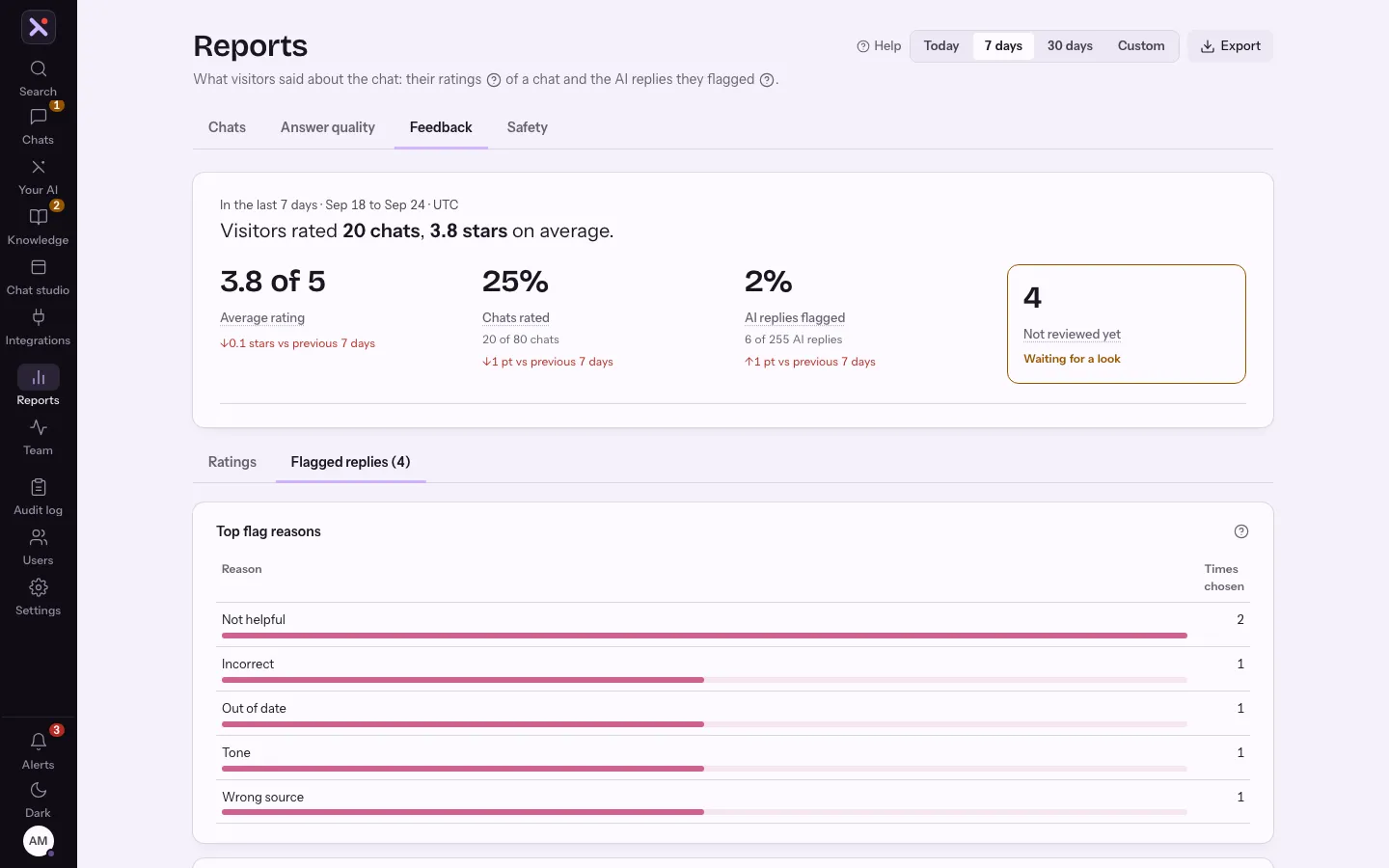
A flag is a visitor marking one AI reply for your team to look at, with optional reasons and a comment. Only the AI’s answers can be flagged, never your team’s messages. A flag sends no alert and changes nothing in the chat: it waits here until someone reads it.
Where to find it
Section titled “Where to find it”Insight, Reports, tab Feedback, then Flagged replies. While flags wait, the tab names how many: “Flagged replies (4)”. Review on the Needs you list of Reports: Chats opens it too. The figures over the list are explained on Feedback: Ratings.
Turn flagging on
Section titled “Turn flagging on”Flagging starts off. Only an Admin can turn it on:
- Open Chat studio and go to the screen that shows a chat under way (Chat studio).
- Switch on Let visitors flag an answer.
- Check the reasons a visitor can pick, and change them to fit your business (Chat studio settings).
- Press Publish. Visitors then see a flag under each AI reply.
Review flagged replies
Section titled “Review flagged replies”- Top flag reasons shows why visitors flagged replies. Press a reason to list only those replies.
- The list shows flags not yet reviewed, newest first, 50 to a page. Each row has Visitor asked, AI replied, the sources the reply cited (“No source cited.” when it had none), and the visitor’s reasons and comment. A long reply is cut short: press Show more to read all of it.
- Press Open this reply in the chat to read it in context. In the chat, the reply carries a line saying the visitor flagged it, with their reasons.
- Decide what to fix (below).
- A Supervisor or Admin presses Mark reviewed. A message says “Marked reviewed” and offers Undo, the flag leaves the list, and the row records who reviewed it and when.
Tick Reviewed (it shows how many there are) to see the flags already reviewed; Put back returns one to the open list. Each change is recorded under the name of the person who made it, on the Chat activity tab of the Audit log.
Decide what to fix
Section titled “Decide what to fix”| What you find | What to do |
|---|---|
| The reply states something wrong or out of date | Correct the source it cited, or write the right answer (Answers, Knowledge) |
| The reply cited no source, or the wrong one | Add what the AI should have answered from, then ask the question again on Test and fix |
| The facts are right but the wording or tone is not | Change what the AI is told on Your AI |
| The AI should not have answered this at all | Add a restricted topic (Restricted topics) |
| The reply is fine and the visitor disagreed | Mark it reviewed; nothing else to do |
Fixing is an Admin’s job. A Supervisor who is not an Admin marks the flag reviewed once the Admin knows about it.
Good to know
Section titled “Good to know”- A reviewed flag still counts in AI replies flagged; only Not reviewed yet and the tab’s count drop.
- If the visitor changes their reasons or comment, the flag returns to the open list.
- A visitor can take their flag back, and can flag after the chat has closed.
- A flag counts in the period its chat started in.
- The Flagged replies spreadsheet file holds every flag of the period, reviewed or not, with who reviewed it (Export).
If something goes wrong
Section titled “If something goes wrong”| What you see | What to do |
|---|---|
| “No replies were flagged in this period.”, and “Visitors flag a reply once it is switched on in Chat studio, A chat.” or “An admin switches feedback on in Chat studio, and then visitors can flag a reply.” | Flagging is off. An Admin follows the link and turns on Let visitors flag an answer |
| “No replies were flagged in this period.”, and “Nobody has flagged a reply in this period.” | Flagging is on; nobody flagged in these days. Choose a longer range |
| “No replies are waiting for review.” | Every flag of the period has been reviewed. Tick Reviewed to read them again |
| “No flagged replies match this reason.” | Choose another reason, or All reasons |
| No Mark reviewed button | Only Supervisors and Admins can mark a flag reviewed |
| “That reply is not flagged.” | The visitor took the flag back meanwhile; nothing to review |
Related
Section titled “Related”Reviewed
Source files for this page
apps/dashboard/src/views/FeedbackView.tsxapps/dashboard/src/views/FeedbackParts.tsxapps/dashboard/src/permissions.tsservices/api/app/conversations/feedback_store.pyservices/api/app/routers/feedback.pydocs/CONVERSATION.mddocs/SETTINGS.mdapps/dashboard/src/views/audit/auditWords.ts

